Vector Glitch
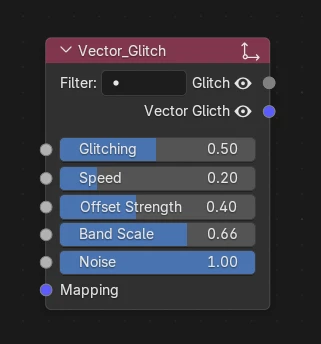
What's it for ?
Distorts an incoming vector (UV / mapping) with glitchy, blocky offsets — horizontal tearing, RGB-style shifts and datamosh-like breakups. Plug it between a coordinate source and a texture's Vector input to give the mapping a digital-glitch look.
Tip
Raise Speed and keyframe Glitching to make the effect flicker in and out over time.
Parameters
Inputs
- Glitching — overall glitch amount / intensity (0 = clean, 1 = fully broken up).
- Speed — how fast the glitch animates over time.
- Offset Strength — how far the vector is displaced (magnitude of the horizontal tear / shift).
- Band Scale — scale of the horizontal glitch bands (higher = more, thinner bands).
- Noise — amount of noise mixed into the displacement (grain / randomness of the breakup).
- Mapping — UV / mapping input; falls back to
TexCoord.UVwhen unplugged.
Outputs
- Glitch — a scalar mask of where / when the glitch is active (use it to drive other effects).
- Vector Glitch — the perturbed vector; plug it into a texture's Vector input.