UV Attr
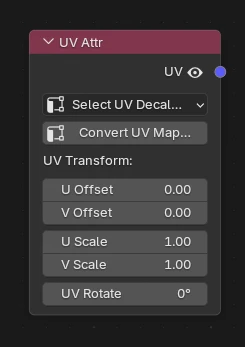
What's it for ?
Outputs a UV coordinate read from a mesh attribute (not a UV Map), with a built-in UV transform (offset / scale / rotation). It is the node created by the Decal Project tool, but you can also use it on its own to drive any Image Texture or mapping from a stored UV attribute.
Tip
The UV is read from a generic FLOAT2 attribute on the vertex (POINT) domain, so it does not count against Blender's limit of 8 UV Maps. You can therefore store as many decal / UV attributes as you need.
Parameters
- UV Attribute — pick the source attribute. The dropdown is filtered to FLOAT2 / vertex attributes only (the valid UV attributes).
- Convert UV Map… — see below.
- UV Transform
- U / V Offset
- U / V Scale
- UV Rotate
Output: UV (vector) — plug it into the vector input of an Image Texture node.
Convert UV Map → Attribute
The Convert UV Map… button turns an existing UV Map of the object into a FLOAT2 attribute on the vertex (POINT) domain — the kind of attribute this node reads. This is the way to free a UV Map from Blender's 8-UV-Maps quota while keeping it usable in the shader.
It opens a dialog with:
- UV Map — the source UV Map to copy.
- Attribute — the name of the created attribute (defaults to the UV Map's name).
- Remove UV Map — if enabled, deletes the source UV Map after the copy, freeing a UV slot.
Once converted, select the resulting attribute in the node's UV Attribute field.
Note
The UVs are stored per vertex (not per face-corner — a face-corner FLOAT2 would still count as a UV Map). This is exact for a seamless projection, where each vertex has a single UV. On a mesh with UV seams, a vertex shared by several islands keeps only one of its UVs.
Setup Example
An UV Attr node feeding the UV input of an Image Texture node — created automatically by the Decal Project tool, and editable afterwards through the transform parameters.