Text Object Tool
What's it for ?
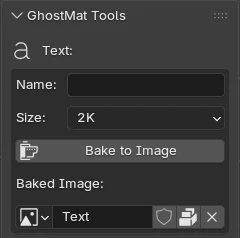
When a Text object is selected, a dedicated Text section appears in the View3D ▸ GhostMatter ▸ GhostMat Tools panel (it takes the place of the Object section).
Bake to Image
Renders the selected text object to an in-memory image — a white mask on a pure-black background, rendered orthographically, with the resolution proportional to the object's bounding box.
- Name — image name (leave empty to use the object's name).
- Size — 1K → 8K (pixel density: the resolution scales with the size of the text).
- Bake to Image — performs the bake.
- Baked Image — the generated image is remembered on the object; clicking Bake to Image again refreshes it in place (no duplicate).
Note
The image is not written to disk — it lives in memory (packed). Save it yourself (Image ▸ Save As, or by saving the .blend).