Mograph Mask
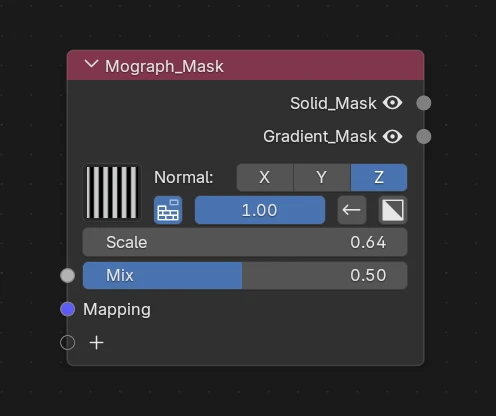
What's it for ?
An animated motion-graphics mask — reveal, wipe or build a material on/off with a chosen pattern. Perfect for 2D elements like text, logos and UI reveals.
Tip
Chain several Mograph Masks together to make things appear and disappear with different styles.
Parameters

- Pattern — the reveal motif, picked from the preview gallery (stripes, blocks, noise…). The last one (custom) uses your own Motif input instead of a preset.
- Axis — direction the effect runs along (X / Y / Z).
-
Progress — turn on the progressive build-on: animate this to reveal / hide the mask over time. When enabled it shows:
- Progress Size — softness / length of the progress edge.
- Reverse — flip the direction of the reveal.
Note
The Progress Gradient input only appears when Progress is enabled — plug a gradient there to drive the reveal from a custom ramp instead of the built-in one.
-
Invert — invert the mask (swap masked / unmasked).
- Scale — scale of the pattern.
Inputs
- Mix — blend factor of the mask.
- Mapping — UV / mapping input for the pattern.
- Progress Gradient (only when Progress is ON) — custom gradient driving the reveal.
- Motif (custom pattern only) — your own shape used as the reveal pattern.
Info
When the pattern is set to custom, the Motif input must be connected — the node shows a warning until it is.
Outputs
- Solid Mask — hard-edged mask (crisp on/off).
- Gradient Mask — soft mask with a smooth falloff.