Ink Decal
What's it for ?
Makes an image bleed like ink on paper. The node reads a decal image (a logo, a drawing, a stamp...) and lets it spread, shrink, be deformed and smeared, as if the ink was running into the fibers of the paper. Animated with a single value, the decal appears as a concentrated stain, then runs and dilutes.
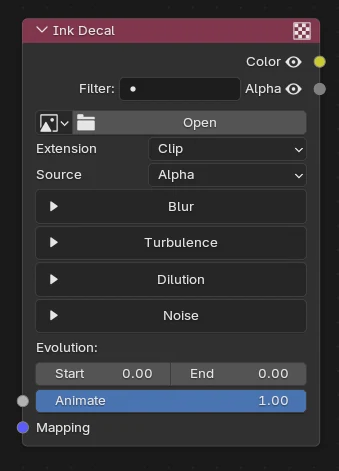
- Mapping (input) — the coordinates used to place the image. Left unplugged, it uses the UV map. Plug a UV Decal to place and scale the decal.
- Animate (input) — from 0 to 1, moves every effect of the node from its Start value to its End value (see below).
- Color (output) — the color of the image carried by the stain.
- Alpha (output) — the shape of the stain after the effects.
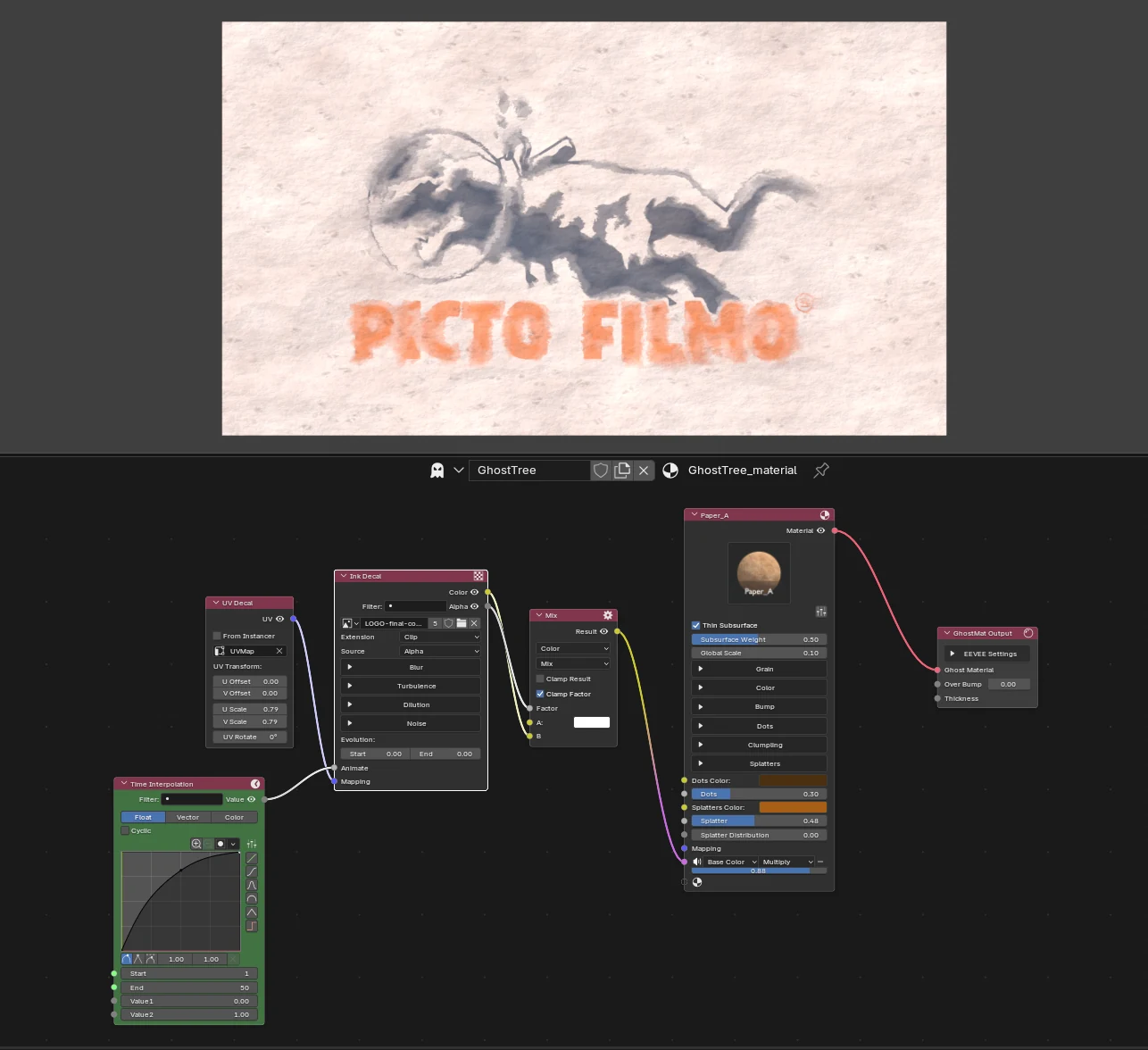
In this example, a UV Decal places the logo, a Time Interpolation drives Animate, and the Alpha is the factor of a Mix that puts the Color on the paper material.
Note
The node needs an image with a clean shape : a decal with an alpha channel (use the Alpha source), or a dark / light drawing on a plain background (use the Dark / Light source).
The image
| Option | Description |
|---|---|
| Image | The decal. |
| Extension | What is read outside the image. Clip (default) : nothing, so the ink never repeats. Extend repeats the border pixels, Repeat tiles the image, Mirror tiles it mirrored. |
| Source | Which part of the image is the stain. Alpha : the opaque part. Alpha Invert : the transparent part. Dark : the dark pixels (black on white). Light : the light pixels (white on black). |
Animate : Start and End
Every effect has a Start and an End value. The Animate socket (0 to 1) gives each effect the value between its Start and its End. One keyframe, or a Time Interpolation, is enough to make the ink run : at Animate = 0 the effects are at their Start, at Animate = 1 at their End.
The default values go from an eroded stain (Spread at −1) to the full image (Spread at 0), with a bit of turbulence and a radial smear.
Blur panel
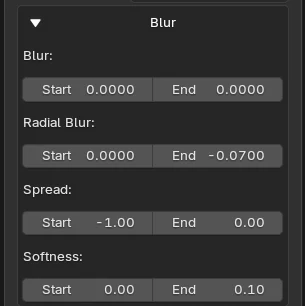
Everything that spreads or smears the image.
| Option | Description |
|---|---|
| Blur | Radius of the blur that rounds the shape (in UV units). The stain is blurred over a disc of this radius, then re-sharpened by a threshold : the larger the disc, the more the details merge. |
| Radial Blur | Smears the stain along the lines that go out of the pivot of the object, like an extrusion. A negative value smears in the other direction. It follows what is visible : an eroded stain is smeared as it is. |
| Random Directional Blur | Works like the Radial Blur, but the direction of the smear changes from one place to another : it is given by the color of a noise instead of the lines going out of the pivot. It follows what is visible, and it adds up with the Radial Blur. |
| Random Direction Scale | Size of the noise whose color gives the direction : a small value gives wide areas smeared the same way, a large one gives a more chaotic smear. |
| Random Direction Contrast | Contrast of that noise. 0 : the raw noise, with soft, similar directions. The higher it is, the more the directions are pushed to the extremes : distinct, strong directions. |
| Random Direction Intensity | Strength of the direction vectors, i.e. the length of the smear (1 = the extremes of the noise give the full amount). |
| Spread | Makes the ink grow (> 0) or shrink (< 0). The further from 0, the further the edges move. A very negative Spread erodes the image until it disappears, and thin shapes vanish first. |
| Softness | Softness of the edge : low gives a hard edge, high gives a progressive gradient. |
| Grain | Random jitter of the samples of the blur, which makes the edges fibrous when the stain spreads or shrinks. 1 : as much as the radius allows. 0 : none, the edge is clean and sharp (with some facets when the Spread is large). |
Turbulence panel
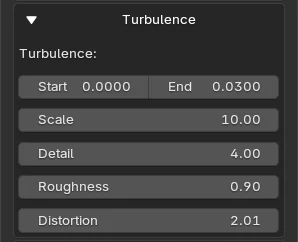
Deforms the edges of the stain with a fractal noise, like the fibers of the paper.
| Option | Description |
|---|---|
| Turbulence (Start / End) | Strength of the deformation. 0 : no deformation. |
| Scale | Size of the noise : a high value gives fine fibers. |
| Detail | Number of noise layers. |
| Roughness | How much each layer contributes compared to the previous one. |
| Distortion | Twists the noise on itself, for more irregular shapes. |
The noise is read in the object coordinates : it sticks to the object and does not follow the Mapping.
The Evolution (Start / End), below the panels, moves the noise (its fourth dimension) : animate it to make the fibers move.
Dilution panel
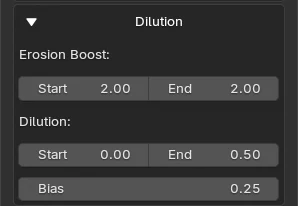
The stain starts concentrated (dense ink) and dilutes as it spreads : the dense cores stay at the center and the borders become light and irregular.
| Option | Description |
|---|---|
| Erosion Boost (Start / End) | When the Spread is negative (the stain is eroded), the remaining ink is boosted so that it keeps its density instead of fading to grey. It has no effect when Spread is 0 or more. |
| Dilution (Start / End) | How much the stain is diluted. 0 : the stain as it is. 1 : the stain is thinned out to a light veil, dense cores are added on top and the border is attenuated. |
| Bias | The proportions of the three expressions : the base image, the added spread (the dense cores) and the border. 0 : the base image alone. The higher the Bias, the more negative the Spread of the cores, the more the border is attenuated and the more the base image is thinned. It sets the mix, not the pace along Animate. |
Tip
Dilution sets how far the stain is diluted along the animation, Bias sets what is expressed. Start with a Bias around 0.25 and a Dilution going from 0 to 0.5.
Noise panel
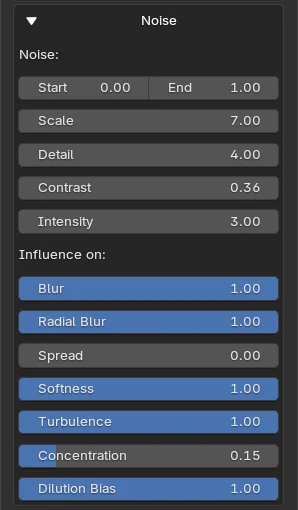
A global noise that makes the effects irregular across the image. It does not replace the value of an effect : it sets how much of it is expressed at each point.
value expressed = value × (1 − influence + influence × noise)
With an influence of 1, a noise of 1 expresses the effect fully and a noise of 0 expresses none of it. With an influence of 0, the noise has no effect on it.
| Option | Description |
|---|---|
| Noise (Start / End) | A multiplier, from 0 to 1, over all the influences below. 0 : the noise does nothing. Animate it to let the noise appear along Animate. |
| Scale / Detail | Size and number of layers of the noise. |
| Contrast | The noise below this value is 0, the rest is stretched up to 1. |
| Intensity | Whitens the noise : above 1, more of it reaches 1. What the effects get never exceeds 1. |
| Influence on | How much the noise modulates each effect : Blur, Radial Blur, Random Directional Blur, Spread, Softness, Turbulence and Dilution Bias. |
| Concentration | Different from the others : it sets the alpha of the whole drawing. With 1, a noise of 0 makes the drawing transparent and a noise of 1 leaves it as it is. |
Good to know
A heavy node
Ink Decal reads the image many times (the blur, the cores, the border and the radial blur). It can slow down the viewport. Keep the Blur and the Radial Blur low while you work.
- The Color output is the color of the image weighted by the stain : with no effect it is the color of the image, and it spreads with the stain. Mix it with the Alpha.
- The node reads the image through the Mapping input. Plug a UV Decal to place, scale and rotate the decal.